I know, I said this more then one year ago, but now I'm really doing it: I decided to stop using my PC laptop, and I decided to finally everything to my Mac. There was one trigger, actually two, that made me take the final decision: the first one was that now I need to develop for the iPhone for work and I didn't want to go to my office with both the Mac (for the iPhone development) and the Dell (for Outlook, OCS, Office, time reporting software, and other internal applications), and then that for the writing my book I had to setup an isolated virtual machine in order to have a clean install and non customized look&feel (no toolbars on IE, no custom schema on VS) for taking the screenshots.

The process

So what step did I take to make the move? For the last we months I've been using a clean Vista Ultimate + Visual Studio 2008 installation as book writing VM. Since all my job is writing code in Visual Studio this is pretty much all I needed, so I decided to use this as my Vista baseline VM. When I first made it I did it with Virtual PC, so I needed to convert it to VMware in order to open it with Fusion. Once converted the VM from VPC to VMware I copied this baseline VM to my Mac, and I opened it with Fusion. And now I've a baseline VM that works both on my Mac and on my PC, and that I can use to build any project specific or task specific Virtual Machine.

The problems

But all this was not without problems: the overall process took a few days to complete. First I had a strange error converting my VPC image to VMware disk. Then I had very strange problem with the mouse inside VMware. And finally I had to struggle a bit to use the VM on both OS.

Conversion from VPC to VMware Disk

The first problem was that the VMware converter failed due to not enough space on the disk: it was a "strange" problem because I had 45Gb on my laptop disk and more than 100Gb on the external drive the virtual disk was located. And then, once I managed to convert an run on VMware Workstation, the mouse pointer was stuck off-screen, so not usable.

Virtual Machine Version

One solved this problem (which required 4 conversion, and 2 full days (as in days and night) to be solved, and that you'll read about later), I opened the VM with VMware Player, I installed the VMware tools, and suddenly Fusion asked me if I wanted to upgrade the VM to the format of version 2. This upgrade should increase performances on Fusion. But this would not allow me to share the same virtual disk on Fusion for Mac and Workstation for Windows.

Performances

Last problem is performance: to run Vista smoothly with Visual Studio with R# I need more than 1Gb of RAM. To run OSX smoothly it needs at least 1Gb of RAM. So it comes that 2Gb are not enough.

Disk Format

The last but not big problem is that the only way to store a 15Gb file on an external drive is to store it either on NTFS or on HFS+... and unfortunately there is no way to write to a NTFS from the Mac (and I don't think there will be a way to read/write a HFS+ from Windows).

Solutions to the problems

How did I solve the problems just mentioned? I actually I did not solve them all, but at least I can use the VM, and somehow I can even share it between Mac and PC.

Conversion from VPC to VMware Disk

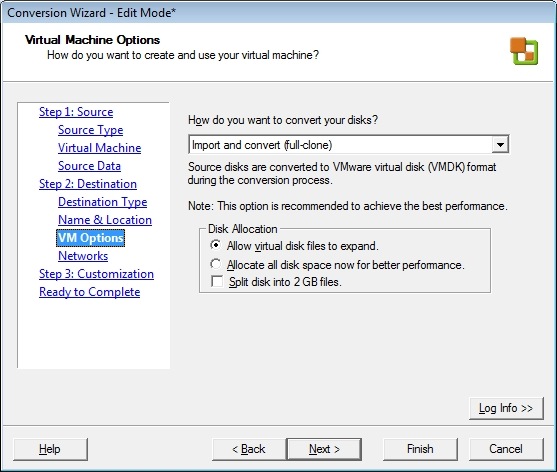
The "not enough space" problem was because, among the options available with the VMware Converter, I choose the "Reduce to minimum size" option when I was asked for the size of the virtual disk. The disk with not enough space was the virtual disk, not my physical disk. To avoid running into this problem make you select the following options:

  • "Maintain Size" when you select the source of the Virtual Machine
  • "Import and convert" when you select the VM Options of the destination VM
step-1.jpg step-2.jpg

The mouse problem was instead caused by the "old" VPC mouse drivers, interfering with the VMware tools and its mouse drivers. In this case the solution is easy: just uninstall the Virtual PC extensions before converting the VPC disk to VMware one. And then, in the customization step, uncheck the "Install VMware Tools" option. And then, when the VM starts, install the tools manually.

step-3.jpg

Virtual Machine Version

This is one of the problems I've yet to solve. For the moment I'm still on the version that is compatible both with Fusion 1.x and VMware Workstation 6.5. When they release a VMware Workstation that supports the Fusion 2 format, I'll update it.

Another solution would be to upgrade and downgrade the VM every time I move it from Mac to PC and the other way around.

Performances

This was an easy fix: I just bought 4Gb of RAM.
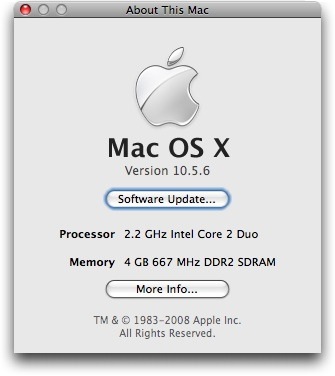
RAM-Upgrade.jpg

I also found out that older versions of MacBook, even if Apple says they support only 2Gb, actually support 3Gb.

The boot is still a bit slow and uses all the CPU of the system, but usually I suspend the VM, so not a big deal.

Disk Format

I solved this problem copying the VM to my local disk when using it on the Mac, and running it from the NTFS disk when running on Windows. I don't think there is going to be a solution to this problem

What's next?

Now I finally can use my Mac both for my day-to-day operations (emails, web browsing, IMs), for my Mac development and also for .NET development (and to use a decent blogging client).

posted on Saturday, January 17, 2009 6:36 PM

Comments on this entry:

# re: Moving all my development to the Mac

Left by Gary McPherson at 1/17/2009 10:20 PM

Hey Keyvan, regarding your disk formatting issue, you really should take a look at MacDrive to access HFS/HFS+ drives from Windows. In order to fully access NTFS drives from OS X, there is a similar product called NTFS for Mac OS X.

# re: Moving all my development to the Mac

Left by Gary McPherson at 1/17/2009 10:24 PM

Apologies, Simone - I followed Keyvan's retweet and mistakenly addressed him in my comment!

# re: Moving all my development to the Mac

Left by Simone at 1/17/2009 11:11 PM

I'll have a look at it... thank you

# re: Moving all my development to the Mac

Left by Speednet at 1/18/2009 9:47 PM

Just wanted to say thanks for putting together a very informative and interesting blog post. Cheers!

-Todd

# re: Moving all my development to the Mac

Left by NC at 1/18/2009 11:34 PM

*unsubscribes from rss feed*

I used a mac for 6 years for dev and video editing. I'll never be going back to that. So much more painful than Windows.

I'll stick to my Linux with VM for Windows, and VM for OSX for iPhone dev.

# re: Moving all my development to the Mac

Left by Simone at 1/19/2009 12:00 AM

@NC: everybody has its own opinions... I think OSX is way better than XP, and Vista... we'll see when it comes to Win7.
And when it comes to HW... I think MB/MBP are among the best laptops ever manufactured.

# re: How to migrate a VirtualPC disk to a VMware Fusion disk

Left by Marco Bellinaso at 1/21/2009 5:46 PM

Wow, I'm going to do the same switch to OSX, and for the same reasons ;)

I have a dual-boot config right now, but since I also do all my work with VS, I never boot from OSX...so I wanted to keep OSX as the primary OS to have it always ready in the background when I have some spare minutes to work on it, and this post comes at a great timing ;)

I also had some of your problems when I tried converting a VM nearly two years ago. At that time, I tried MacDrive to read a HFS+ partition and it worked great. However, a Mac fanboy friend of mine tells me that writing to NTFS disks is perfectly possible from OSX without buying 3rd party software. Last time I checked it wasn't, unless I missed some optional component to install...but maybe there's something new since 2 years ago?

# re: How to migrate a VirtualPC disk to a VMware Fusion disk

Left by Simone at 1/22/2009 1:27 AM

I've not idea...
I can read NTFS without any additional component, but NTFS disks are always mounted as read only.

# re: How to migrate a VirtualPC disk to a VMware Fusion disk

Left by Simone at 1/22/2009 1:29 AM

Maybe MacFuse can be a solution.
http://code.google.com/p/macfuse/

I've to give it a try

# re: How to migrate a VirtualPC disk to a VMware Fusion disk

Left by Marco Bellinaso at 1/22/2009 9:46 AM

My friend told me this:

====
OS X can read and write to and from a NTFS partition if that partition is networked. So, an external USB NTFS drive which you just plug into your Mac will not be writeable, but if you plug that HD into a Windows box which you then connect to your Mac via LAN or something, your Mac will be able to write to that HD.
===

It won't probably be useful for you, because you'd surely like want to attach your external HD via USB directly, and don't network it through a Win machine...but maybe it's a useful tip when you work from home or in some other situations.

All other posts I found talking about this issue point to MacFuse too. If you test it or find some other tricks, please post the results here ;)

# re: How to migrate a VirtualPC disk to a VMware Fusion disk

Left by Simone at 1/22/2009 9:53 AM

Well... obviously... when it goes through the network, is not that Mac that read and writes to the disk, but the Windows machine to which the disk is attached to.

# re: How to migrate a VirtualPC disk to a VMware Fusion disk

Left by Marco Bellinaso at 1/22/2009 3:21 PM

I haven't tried this personally, but people around the web talk positively about it:
http://www.paragon-software.com/home/ntfs-mac/

# re: How to migrate a VirtualPC disk to a VMware Fusion disk

Left by SQLtech at 2/10/2009 12:37 AM

Some great tips here on converting virtual disks, thanks. I think there is a way to write to NTFS from mac if you hunt around.

# re: How to migrate a VirtualPC disk to a VMware Fusion disk

Left by Melle Slotema at 3/25/2009 12:34 PM

Hi folks,
I am a software architect/developer for .net, but use the Mac for "everything else" :)

I use NTFS-3G (With macFuse). It's free, and works like a breeze.
Reading and writing NTFS like a native drive.

One caveat for working with NTFS is that the (external) disk should be properly unmounted from Windows.

Cheers

# re: How to migrate a VirtualPC disk to a VMware Fusion disk

Left by cornelius at 3/26/2009 3:11 AM

Thanks for the article. My situation is somewhat similar. I have been running VPC on an upgraded Pismo. I recently bought a MBP 2.4 GHz 2 GB RAM, upgradeable to 6 GB. I would like to migrate the VPC to the MBP. I have the VPC install disks, but I don't have separate XP installer. I have downloaded VMware Fusion, but nothing works. Ideas?

Comments have been closed on this topic.